
The Smart Oil Gauge is an accurate and reliable wireless tank monitor! It’ll give you accurate readings for both your usage and level data! However, the most important thing to know regarding the Smart Oil Gauge is its tank configuration! If the gauge isn’t set up for the proper tank size, then it won’t be accurate. This is very important for the gauge’s functionality! I’ll be going through how to make sure that the Smart Oil Gauge is set up for the right tank size!
Compatible Tanks
Tank compatibility for the Smart Oil Gauge is very important. The device needs to be on the exact tank size that you have for your level and usage data to be accurate. So if you’re setting up the gauge and you don’t see your tank size showing up on the tank styles, then please contact our tech support, and you’ll be able to get a custom tank ID for your tank size!
The most common tank sizes that the Smart Oil Gauge is installed onto are Granby steel tanks and Roth tanks. However, Roth installations require our Roth Adapter. While most Granby tanks are usually 275 or 330, Roth tanks have a bit more variety. If you look at the label on the side of the tank, you’ll see what size tank it is. This tends to range from 110 (400L) gallons all the way up to 400-gallon tanks! Even if it’s not displayed on the app, we have the custom tank ID programmed for each Roth tank style!
However, the Smart Oil Gauge is not compatible with Roth 1500L (400-gallon) tanks. This is because these tanks have an interior support baffle that prevents the tank from bowing in on itself. The gauge’s signal will bounce off the internal baffle, resulting in being unable to read beyond half a tank!
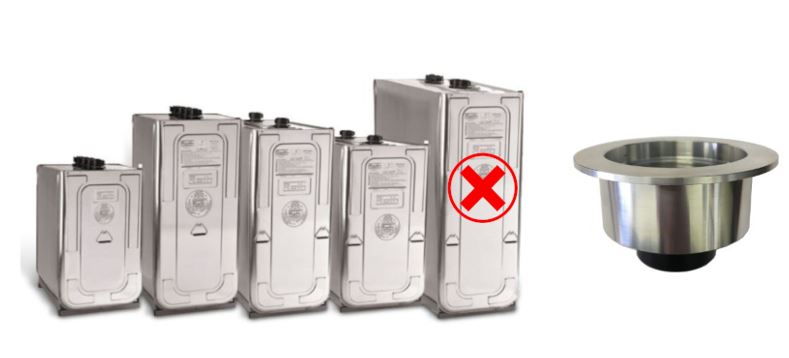
Additionally, tanks that are fiberglass or underground are not compatible with the Smart Oil Gauge. Fiberglass tanks are common in Canada. These tanks tend to have a lip on the bottom of the fitting. The Smart Oil Gauge will often catch this lip, causing the gauge to read “Full”. On Underground tanks, due to the tall pipes sticking out of the ground, the Smart Oil Gauge’s signal won’t be able to reach the oil level. This’ll cause the gauge to read only “Full” like on Fiberglass tanks. On underground tanks, it’s best to use a stick measurement, such as a yardstick.
Setting Up the Tank Size
After you’ve determined what size tank your Smart Oil Gauge will be installed on, we’ll need to set it up in the app. The tank sizes available on the app are Granby 275 & 330-gallon tanks. You can configure these in both horizontal and vertical orientations. We also have Roth 620L and 1000L tanks available on the app; the other Roth tank configurations are available here. If you have one of these tank sizes, then great! You can simply choose one of those tanks on the tank style screen! Otherwise, if you contact our support with the dimensions of your tank, we can give you a custom tank size! However, on the top right, you will see an option labeled “Advanced”. This is where you will input the custom tank ID and add an offset if you have the gauge installed into an adapter.
Usually, the tank style selection will come up on the initial setup of the Smart Oil Gauge. However, if your gauge is already configured, then you’ll have to go back to that screen. On IOS devices, in the tank detail screen, you’ll see a little gear on the bottom left. Select that and then click on “My Tank” underneath “Sensors”. On Android devices, it’s three dots on the top right, before you press configure. You’ll then be brought to the same “Tools” screen.
Side note: in this same screen, there’s an option labeled “Upload Interval”. This isn’t related to the Smart Oil Gauge tank configuration. However, this is a setting that will determine how often the Smart Oil Gauge is going to upload to the app. It can be set from anywhere between 1 and 24 hours. The more frequently you have it report, the faster it’ll burn through the battery life.
Tank Orientation
I mentioned earlier that there are both horizontal and vertical tank orientations for Granby steel tanks. This is very important. Horizontal tanks tend to be much shorter, usually a little over two feet tall, but are much wider with a flat top. These tend to look like vertical tanks lying on their sides. Vertical tanks tend to be taller (usually around 5ft tall), with flat sides and a rounded top. I’ve added a picture of a side-by-side comparison for your convenience.
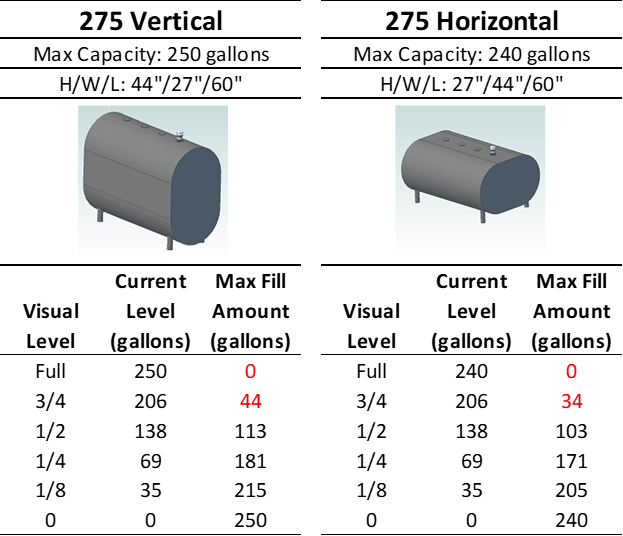
If your Smart Oil Gauge isn’t set up for the correct tank configuration, then it’ll be inaccurate. Say, for example, you have a horizontal tank, but the gauge is reading for a vertical tank. Your readings won’t be accurate in terms of usage and level. In the worst-case scenario, the Smart Oil Gauge will read that there’s oil in the tank, but in actuality, you’ve run out of oil! While this doesn’t happen normally, it can happen if you haven’t set the correct tank size or your Smart Oil Gauge. To be on the safe side, feel free to set the gauge up next to your tank! You’ll be able to see exactly what your tank looks like during the setup procedure!
The Importance of your Tank Configuration
The tank you have your Smart Oil Gauge set up for is crucial for its functionality! The gauge won’t be accurate unless it’s set up for the proper tank size! There are a multitude of tank sizes out there, so if your tank’s size doesn’t show up on the app, don’t worry! Simply contact our tech support with your tank’s dimensions, and we’ll go ahead and configure a custom tank size for you! You can reach me at 203-456-1499, option 3, from 8 am-5 pm EST, Monday through Friday.
Happy Heating,
Hunter